The AI Marketing Stack for 2026: What to Use and Skip
Every quarter, a new “ultimate AI marketing tools” listicle appears. It names 30 tools, reviews none of them honestly, and leaves you with decision paralysis and a dozen free trials you will never use.
This is not that article.
This is the stack we actually use and recommend to D2C brands we work with at Gemoniq. Four layers. Three budget tiers. Honest opinions on what works, what is overhyped, and what you should build yourself instead of buying.
In this article:
- The four layers every marketing stack needs
- What changed in 2026 (and what the listicles get wrong)
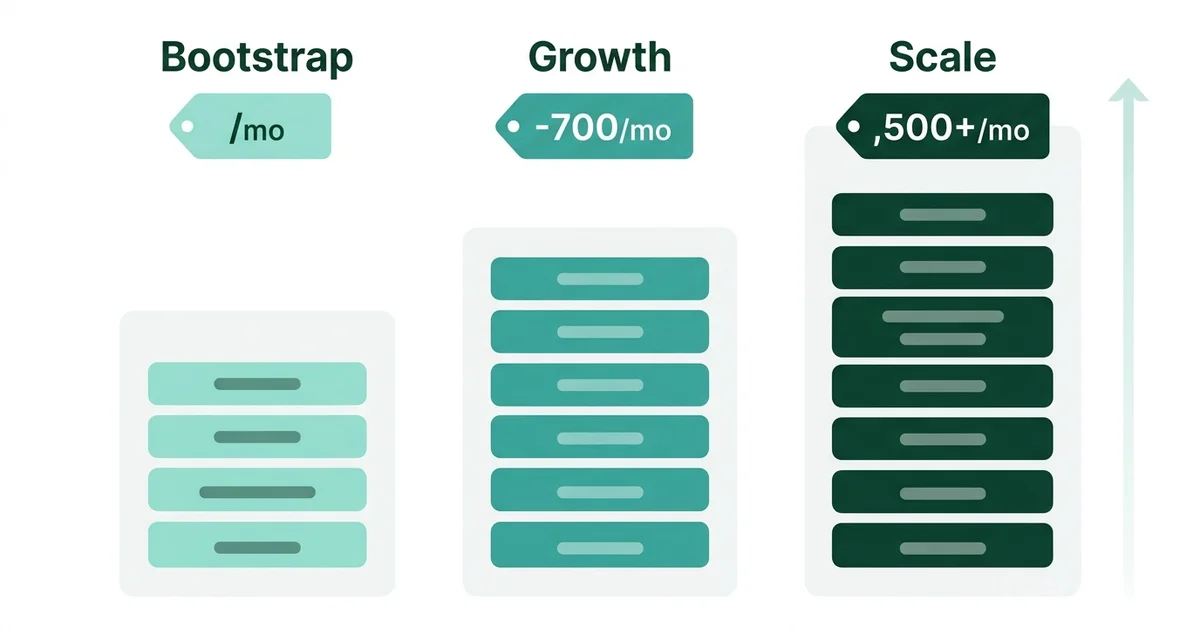
- The bootstrap stack ($100 to $150/month)
- The growth stack ($500 to $700/month)
- The scale stack ($1,500+/month)
- Build vs buy: when custom beats SaaS
- The layer most teams ignore (and where Gemoniq fits)
The four layers every marketing stack needs
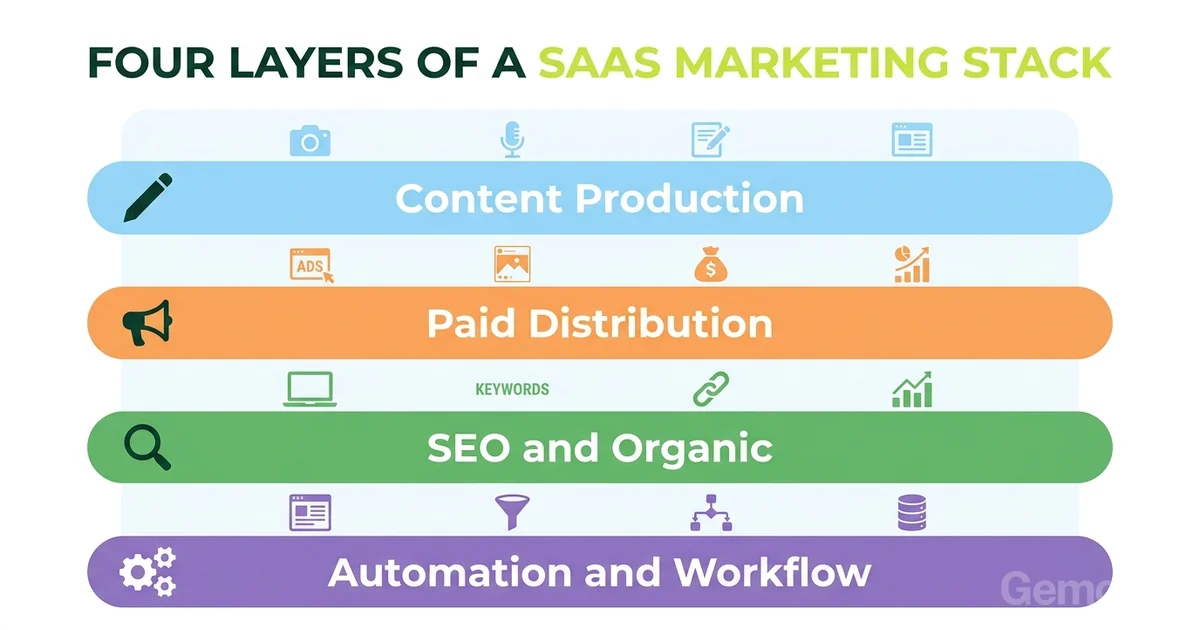
Before you pick any tool, understand the job it needs to do. Every D2C marketing operation has four layers, whether you have formalized them or not.
Layer 1: Content Production
The tools that help you create marketing assets: ad copy, blog posts, social content, images, video, landing pages.
This is where most teams start and where most of the AI hype lives. And honestly, this layer is mostly solved. The tools are good enough. The bottleneck has moved.
Layer 2: Paid Distribution
The tools that help you run and manage paid advertising across Meta, Google, TikTok, and other channels. Campaign setup, audience management, bid strategy, creative testing.
This is where most of the money goes, and where most of the money gets wasted. The gap is not in campaign management tools. The gap is in the diagnostic layer between running ads and understanding what the data is telling you.
Layer 3: SEO and Organic
The tools that help you rank in search, build organic traffic, and create content that compounds over time. Keyword research, content optimization, technical SEO, link building.
AI has made this layer dramatically more efficient but also more competitive. Everyone can produce SEO content now. The advantage has shifted from volume to quality and topical authority.
Layer 4: Automation and Workflow
The tools that connect everything else: email sequences triggered by ad engagement, CRM updates from form submissions, reporting dashboards that pull data from multiple sources, internal workflows that move work between team members.
This layer is unsexy and underinvested. It is also where the compound returns live, because automation turns one-time work into recurring value.
What changed in 2026
Three shifts that the tool listicles consistently miss:
1. Content production tools commoditized. ChatGPT, Claude, Gemini, and a dozen wrappers all produce acceptable marketing copy. The tool you use matters less than the system you use it in. A mediocre tool inside a good growth loop beats a great tool used randomly.
2. The diagnostic gap became the bottleneck. Most teams can now produce content and run ads efficiently. What they cannot do is diagnose why something is not working and fix the right thing. This is the problem we detailed in Facebook Ads Not Working and How to Read Your Ad Account. No tool solves this automatically. It requires a framework and someone who knows how to apply it.
3. Integration became more valuable than features. A tool with 50 features that does not connect to your ad platform, your analytics, and your CRM is less useful than a simple tool that does. The winning stacks in 2026 are not the ones with the best individual tools. They are the ones where data flows without manual work.
The real question is not 'which tool' but 'which layer'
Before you add any new tool, identify which layer is your actual bottleneck. If your content is fine but your ads are underperforming, a better content tool will not help. If your ads are working but your landing pages are leaking, an ad management platform will not help. Diagnose the layer first. Buy the tool second.
The Bootstrap Stack ($100 to $150/month)
For solo founders and small teams spending under $5K/month on ads. Every dollar counts. The goal is to cover all four layers without overspending on features you will not use.
Content Production
ChatGPT Plus or Claude Pro ($20/month)
Pick one. Either works for ad copy, blog drafts, email sequences, and landing page copy. Do not pay for both. Do not pay for a wrapper that adds a template library on top. The templates are not worth the markup.
Canva Pro ($13/month)
For static ad images, social graphics, and basic video editing. The AI features (background removal, magic resize, text-to-image) are genuinely useful at this price point. Skip Midjourney unless you are producing brand imagery specifically.
Paid Distribution
Meta Ads Manager (free)
At this budget level, you do not need a third-party ad management tool. Meta’s native Ads Manager does everything you need. The custom column setup from our diagnostics guide makes it significantly more useful than the default view.
Google Ads (free platform, you pay for ads)
If you run search ads. At bootstrap budgets, focus on one platform. Meta for most D2C brands, Google for high-intent categories.
SEO and Organic
Google Search Console (free)
Non-negotiable. Shows you what queries bring traffic, which pages rank, and where technical issues exist. If you are not checking this weekly, you are flying blind.
Ubersuggest or SE Ranking ($29 to $39/month)
Budget keyword research and rank tracking. Not as deep as Ahrefs or Semrush but sufficient for identifying opportunities and tracking progress at this spend level.
Automation and Workflow
Google Sheets + Zapier free tier
At this budget, your “automation” is a well-organized spreadsheet and a few Zapier connections (form submission to email list, purchase to thank-you sequence). It is manual but functional.
Mailchimp or Brevo free tier
For email. The free tiers cover up to 500 contacts with basic automation. Enough to run a welcome sequence and a weekly newsletter.
Total: $62 to $92/month (plus ad spend)
“The bootstrap stack is not about having fewer tools. It is about having no tool that you pay for but do not use weekly. If you are not opening it every week, cancel it.
”
The Growth Stack ($500 to $700/month)
For teams spending $10K to $50K/month on ads with 2 to 5 people involved in marketing. You need better data, faster workflows, and some real automation.
Content Production
Claude Pro or ChatGPT Plus ($20/month)
Same as bootstrap. The AI is good enough. Do not upgrade to a $200/month tool unless you have proven the bottleneck is content quality, not content strategy.
Canva Pro ($13/month)
Still the best value for visual content production.
CapCut Pro or Descript ($24 to $33/month)
If you produce video ads (and you should, based on everything in The Human Ads Playbook), you need a video editor that handles captions, cuts, and basic effects. CapCut for short-form social. Descript if you do longer content or podcast clips.
Paid Distribution
Meta Ads Manager (free) with the diagnostic framework
At this level, you should have the custom diagnostic view set up, the weekly reading rhythm running, and the 3-Layer Diagnosis as your standard troubleshooting process.
Gemoniq Grow ($49/month, founding member pricing)
At this tier, Gemoniq gives you the strategy agent, marketing plan, content agent, and campaign hub. It replaces the need for separate content planning and campaign management tools. Worth trying before committing to more expensive point solutions.
Triple Whale or Northbeam ($100 to $200/month)
Attribution gets messy above $10K/month in ad spend. Meta over-reports, Google over-reports, and your Shopify dashboard tells a third story. A dedicated attribution tool reconciles these and gives you a single source of truth for which channels are actually driving revenue.
SEO and Organic
Ahrefs Lite or Semrush Pro ($99 to $130/month)
At this spend level, invest in proper keyword research, competitor analysis, and backlink monitoring. The depth of data matters when you are publishing weekly and competing for rankings.
Surfer SEO or Clearscope ($49 to $89/month)
Content optimization. These tools analyze what ranks and tell you what to include. Useful for blog content and landing page copy. Not a substitute for original thinking, but a good quality check.
Automation and Workflow
Klaviyo or Omnisend ($45 to $100/month)
Upgrade from free-tier email to a proper e-commerce email platform. Abandoned cart flows, post-purchase sequences, win-back campaigns. These automations typically pay for themselves within the first month.
Zapier Starter ($19.99/month)
More connections, more steps per automation. Connect your ad platforms, email, CRM, and reporting into automated workflows.
Notion or ClickUp ($8 to $10/month per user)
For team coordination. Campaign briefs, content calendars, creative reviews. The tool matters less than the habit of documenting what you are testing and what you learned.
Total: $380 to $620/month (plus ad spend)
Not Sure Which Stack Fits Your Stage?
We'll look at your current spend, team size, and goals and recommend exactly which tools to keep, add, and cut. Free 30-minute walkthrough.
The Scale Stack ($1,500+/month)
For teams spending $50K+/month on ads with dedicated marketing staff. At this level, the stack is about speed, depth, and removing every manual step that slows down the learning loop.
Content Production
AI tools ($20 to $50/month)
Same tier. The content production layer does not scale linearly with spend. What scales is the system around it: how fast you can go from insight to brief to variant to live.
Figma ($15/month per editor)
For landing page design, ad creative iteration, and brand asset management. At scale, you need a design tool that supports collaboration and version control.
Professional video production ($500 to $2,000+/month, variable)
At this spend level, blend raw human-feeling creative with selectively produced hero content. The ratio should be roughly 70% raw to 30% produced, not the other way around.
Paid Distribution
Gemoniq Platform + Managed Services
Gemoniq fits at multiple tiers. The AI platform starts at $49/month (Grow) for strategy, content, and campaign tools. The Pro tier at $149/month adds content studio, campaign automation, and ads management. For teams that want a fully managed service, The Partner plan at $499/month (founding member pricing, limited spots) includes a dedicated strategist, human-produced content (5 films + 100 images/month), and monthly strategy calls.
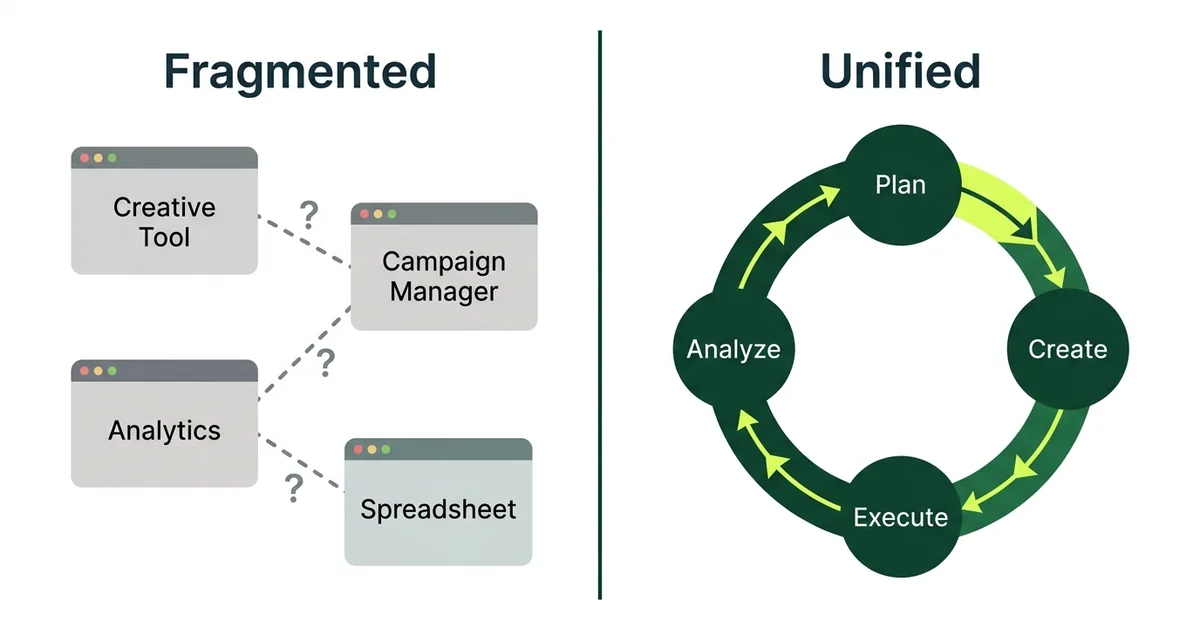
At this spend level, Gemoniq replaces the fragmented workflow of separate creative tools, campaign management, analytics dashboards, and spreadsheet reporting with a single system that runs the entire AI Growth Loop. Campaign planning, creative execution, data analysis, and optimization happen in one place.
Why this matters at scale: When you are spending $50K+ monthly, a 10% improvement in efficiency is worth $5K/month. The diagnostic precision described in our diagnostics guide is not something most in-house teams can sustain at this velocity. Compare that to the typical agency cost of $1,500 to $5,000/month for similar services.
SEO and Organic
Ahrefs Standard or Semrush Guru ($199 to $250/month)
Full keyword tracking, site audit, content gap analysis, and competitor monitoring. At scale, you need historical data and the ability to track hundreds of keywords.
Clearscope ($170/month)
Content optimization at volume. When you are publishing multiple posts per week, automated content scoring keeps quality consistent.
Automation and Workflow
Klaviyo Growth ($150+/month)
Full-featured email and SMS with advanced segmentation, predictive analytics, and deep Shopify integration.
Make or n8n ($29 to $99/month)
More sophisticated automation than Zapier. Multi-step workflows, conditional logic, error handling. Connect your ad platforms, CRM, email, Slack, and reporting into automated pipelines.
Looker Studio or Databox ($0 to $99/month)
Consolidated reporting. Pull data from Meta, Google, Shopify, Klaviyo, and Google Analytics into a single dashboard. At scale, you cannot afford to check five platforms to understand performance.
Total: $1,500 to $3,000+/month (plus ad spend)
Build vs buy: when custom beats SaaS
Not everything should be a subscription. Some of the highest-value tools in a marketing stack are the ones you build yourself because they are specific to your business logic.
Build when:
- Custom attribution logic. Every business has unique conversion events and attribution needs. A custom data pipeline from your ad platforms to a simple database gives you the exact metrics you need without paying for features you do not.
- Creative testing frameworks. The 50/30/20 hook portfolio and test matrices described in our articles can be tracked in a custom spreadsheet or Notion database tailored to your specific creative categories. No SaaS tool does this exactly the way you need it.
- Reporting dashboards. Google Looker Studio is free and connects to almost everything. A custom dashboard built around your specific KPIs and diagnostic layers is more useful than any pre-built report.
Buy when:
- The tool does something technically complex. Keyword research databases, ad platform APIs, email deliverability infrastructure. You are not going to build Ahrefs or Klaviyo.
- Speed matters more than customization. If you need to launch this week and a SaaS tool gets you 80% of the way there, buy it.
- Maintenance cost exceeds subscription cost. Custom tools need maintenance. If the ongoing cost of maintaining a custom solution exceeds the subscription fee, buy the SaaS.
The tool trap
The most common mistake at every budget level is adding a new tool to solve a process problem. If your team does not have a diagnostic framework for reading ad performance, no dashboard tool will help. If your team does not have a creative testing system, no AI production tool will help. Fix the process first. Add the tool second.
The layer most teams ignore
Look at the three stacks above. The paid distribution layer is the thinnest in the bootstrap and growth stacks. Most teams at those levels rely on Meta Ads Manager alone, maybe with a basic attribution add-on.
That is fine for running campaigns. It is not fine for diagnosing and improving them systematically. The gap between “running ads” and “running a growth loop” is the diagnostic and iteration layer. It is the difference between spending money and investing it.
This is where the frameworks from our other articles become operational:
- The AI Growth Loop provides the system for turning ad spend into compounding returns
- Facebook Ads Not Working provides the diagnostic framework when results drop
- How to Read Your Ad Account provides the reading patterns for catching problems early
- The Human Ads Playbook provides the creative strategy for producing ads that actually convert
The stack is the infrastructure. The frameworks are the operating system. You need both.
How to choose your stack
Identify your bottleneck layer
Is the problem content production, paid distribution, organic growth, or workflow automation? Do not invest in the layer that is already working.
Match your budget tier
Bootstrap if under $5K/month ad spend. Growth if $10K to $50K. Scale if above $50K. Do not buy scale tools at bootstrap budgets.
Start with one tool per layer
Add tools only when you hit a specific, named limitation with your current setup. “It would be nice to have” is not a reason to subscribe.
Review quarterly
Cancel anything you have not used in the last 30 days. Add only what solves a problem you documented during your weekly diagnostics.
How Gemoniq fits in the stack
Gemoniq is not a content tool. It is not an analytics dashboard. It is the diagnostic and execution layer for paid advertising.
We run Meta Ads end to end for D2C brands, which means we replace the fragmented approach of separate creative tools, campaign managers, and reporting platforms with a single operating system:
- Campaign planning informed by diagnostic data, not guesses
- Creative execution built around the human ads framework and structured testing
- Performance diagnosis using the 3-Layer framework across every campaign, every week
- Iteration loops that feed this week’s data into next week’s creative and targeting decisions
The result is an ad account that compounds in performance instead of plateauing, because every cycle teaches the next one what to do differently.
Get Your Stack Reviewed
We will look at your current tools, ad spend, and team setup and tell you exactly what to keep, what to cut, and where the real bottleneck is. Free, 30 minutes, no pitch.
Architectural Intelligence
Get the weekly newsletter on design-led performance marketing, directly to your inbox.
No spam. Just intelligence. Unsubscribe anytime.